Concrete in this game has an albedo of 0x9c948d. 156, 148, 141. Warm neutral grey, the colour of a sidewalk. On screen it was rendering at 38, 1, 34.
One. Out of 255.
That is not a colour balance note, that is a channel dying. So I measured the whole frame instead of squinting at it, and green came back as the minimum channel on 86.6% of non-black pixels, at a mean luminance of 25 with 83.5% of the screen sitting below L=40. Red plus blue minus green is magenta, which is exactly why a street set at dusk was reading as a rendering fault rather than an hour of the day.
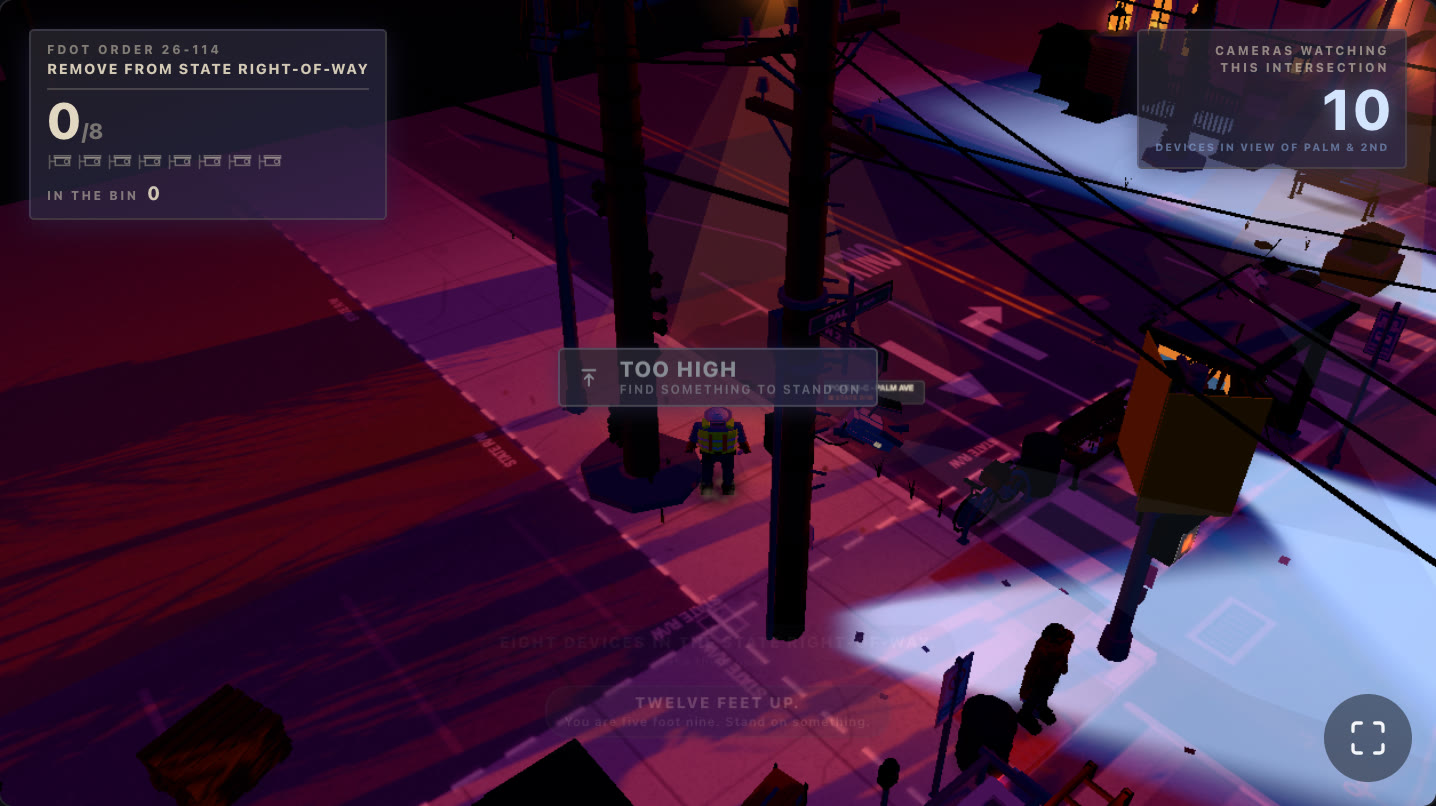
Neutral concrete, violet asphalt, pink crosswalk paint. Every surface in this shot is supposed to be grey.
Two causes, independent, neither one visible by eye. The game is NOT MY POLE, one Florida corner at the minute the streetlights come on, and getting that hour right is the whole art direction, so I could not ship past it.
Nothing I ever wrote had been on screen
The first thing I checked was the sky, because the sky is where the palette comes from. I sampled a column of pixels from the zenith down to the horizon expecting a gradient.
I got 33, 31, 58. Four times. Identical.
A gradient that returns the same value at four different heights is not a gradient. It is one colour. And #211f3a is 33, 31, 58, which is this, sitting in scene.tsx about ninety lines below the shader I thought I was measuring:
<div
  style={{
    position: 'absolute',
    inset: 0,
    containerType: 'size',
    overflow: 'hidden',
    background: '#211f3a',
  }}
>
The stage div. I had been looking at CSS through a transparent canvas for the entire build.
React Three Fiber creates its renderer with alpha: true unless told otherwise, which is right there in the installed source:
const defaultProps = {
  canvas: canvas,
  powerPreference: 'high-performance',
  antialias: true,
  alpha: true
};
My gl prop overrides antialias and nothing else, so the canvas kept its alpha channel, and every pixel the scene failed to draw let the div underneath show through. That is the part worth stealing from this: a transparent canvas converts "your geometry did not render" into "your CSS rendered", and CSS is by definition a colour somebody chose on purpose. It never looks like a failure. If the clear had been the default black I would have caught it in the first five minutes.
The geometry was the mistake:
const geometry = useMemo(() => new THREE.SphereGeometry(1, 32, 20), [])
A one metre sphere, parked at the world origin, with a camera that orbits the player at distWide: 13.8. The camera stands outside its own sky dome. Fixing it is two lines, a bigger radius and a mesh that rides the camera every frame:
const geometry = useMemo(() => new THREE.SphereGeometry(4, 32, 20), [])
// ...
useFrame((state, dt) => {
  if (uTime) uTime.value += dt
  const m = dome.current
  if (m) m.position.copy(state.camera.position)
})
The dome also turned out to be writing linear values straight into an sRGB framebuffer. It is a ShaderMaterial and it ends with an explicit gl_FragColor assignment, so nothing converted anything, and every other shader in the folder ends with three's own chunks. Two lines at the bottom of main():
  gl_FragColor = vec4(col, 1.0);

  #include <tonemapping_fragment>
  #include <colorspace_fragment>
Three prepends the tonemapping pars for a ShaderMaterial on its own whenever the renderer has tone mapping enabled, so only the call sites are needed. Without them the whole ramp between the gradient stops gets compressed into the bottom of the range and the sky reads dark and flat even once it is actually drawing.
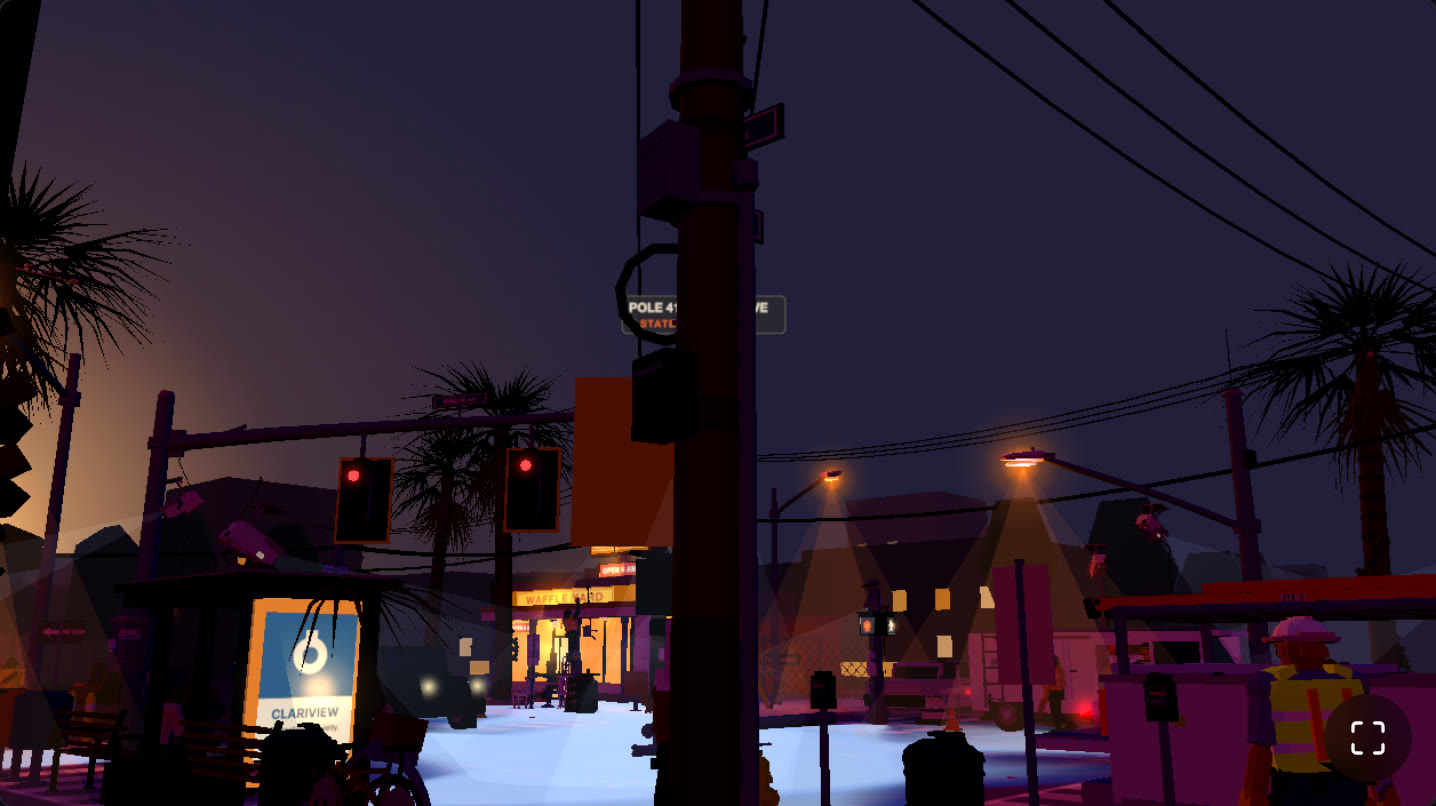
Before. That flat lavender wash above the palms is a CSS background colour.
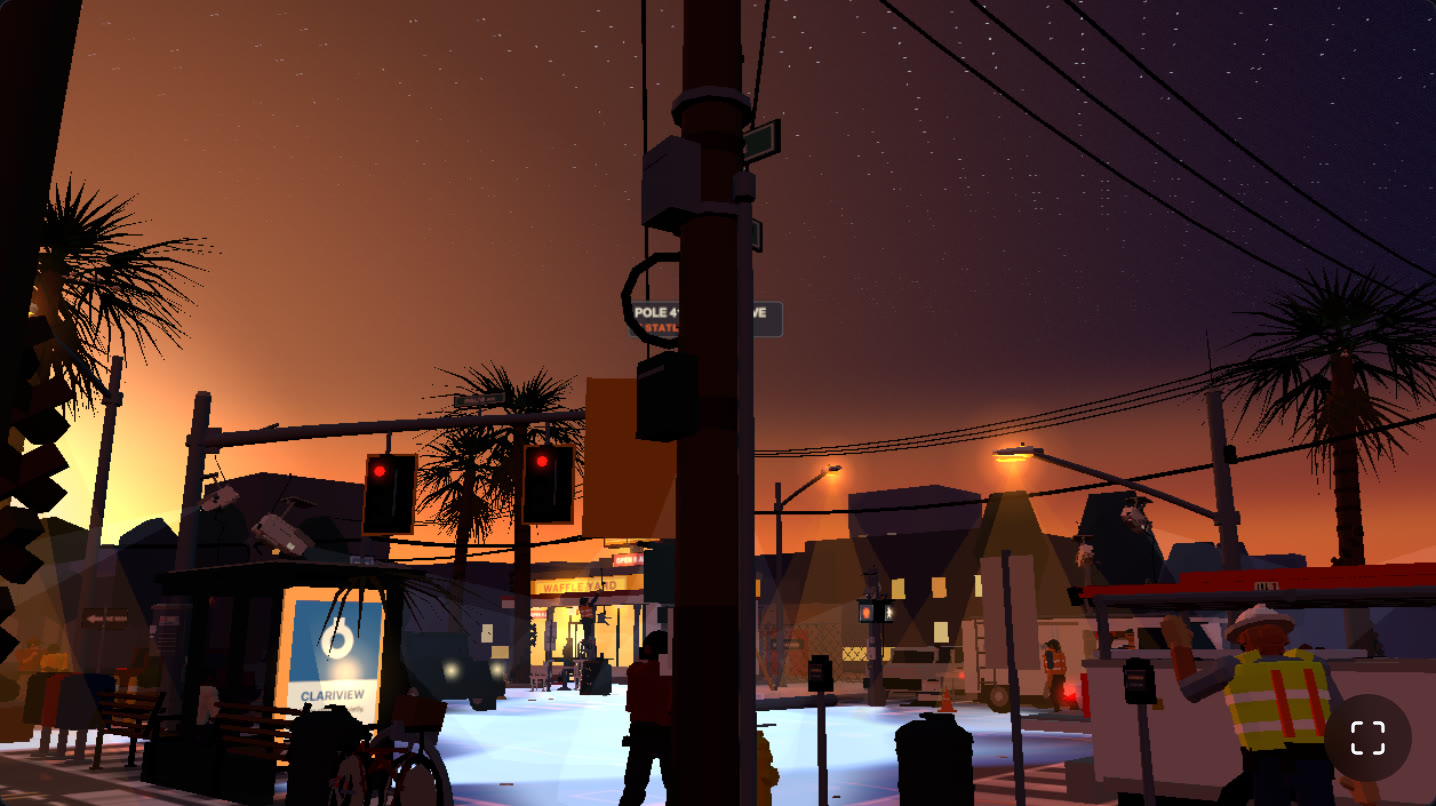
After. Sodium band on the horizon, rose through the middle, violet-blue and first stars at the top. The hour arrived all at once.
Now for the one that was actually eating green
Sky fixed, and the street was still magenta. So I went and read the tonemapper, because at that point it was the only thing left between my shader output and the framebuffer.
I had picked NeutralToneMapping for a good reason. ACES turns warm sodium highlights chalky, and Khronos PBR Neutral is built to hold highlight hue. Here is what it actually does, copied out of three/src/renderers/shaders/ShaderChunk/tonemapping_pars_fragment.glsl.js:
vec3 NeutralToneMapping( vec3 color ) {

	const float StartCompression = 0.8 - 0.04;
	const float Desaturation = 0.15;

	color *= toneMappingExposure;

	float x = min( color.r, min( color.g, color.b ) );

	float offset = x < 0.08 ? x - 6.25 * x * x : 0.04;

	color -= offset;

	float peak = max( color.r, max( color.g, color.b ) );

	if ( peak < StartCompression ) return color;

	// ... highlight rolloff and desaturation
}
Read the early-out first. StartCompression is 0.76. The brightest channel in the pixel I was chasing is 0.026 in linear. My scene is a night street with no sun in it, so essentially every pixel returns at that if, and the entire highlight rolloff, the whole reason I chose this operator, never executes. For a dark scene NeutralToneMapping is nothing but two lines: multiply by exposure, subtract the minimum channel.
And subtracting the minimum channel is a big deal. For x < 0.08, offset is x - 6.25x², so what comes out of the smallest channel is:
x_out = x - (x - 6.25x²) = 6.25x²
The minimum channel gets squared. In eight-bit terms:
| min channel in | min channel out |
|---|---|
| 16 | 1 |
| 25 | 2 |
| 39 | 8 |
| 56 | 25 |
| 80 | 56 |
At x = 0.08 that lands on exactly 0.04, which is the constant the other branch uses, so the quadratic is a smooth roll-off of a fixed black point rather than a special case. It is a nice piece of design. It is also, mathematically, saturation. Subtracting the same amount from all three channels while driving the smallest to zero takes a dark pixel's saturation to 1 by definition. NeutralToneMapping deepens blacks by pushing every dark pixel as far toward pure hue as it will go, and that hue is decided entirely by whichever channel happened to be smallest.
Run my concrete pixel backwards through it. Output 38/1/34 means the minimum came out at 0.000302 linear, so x was 0.00697 and the offset subtracted was 0.00667. Add that back to all three:
with the black point:     38 /  1 / 34
without the black point:  45 / 20 / 42
Same pixel. One is a dim violet-grey I could have graded. The other is magenta.
Why green was the channel standing under the piano
The tonemapper does not pick a victim. It executes whatever bias my light rig already had, and mine had a big one. Convert the palette to linear and the ratios are the whole story:
key      0xffa96b   1.000 0.397 0.147    r/g = 2.52
hemiSky  0x8f9ad8   0.275 0.323 0.687    b/g = 2.13
sodium   0xffb85e   1.000 0.479 0.112    r/g = 2.09
asphalt  0x38343f   0.040 0.034 0.050    green is the minimum
A warm key gives red. A cool sky dome gives blue. The sodium lamps give more red. Nothing in the rig leads with green, so green sits second everywhere and drops to last the moment an albedo tips it there. Which the asphalt did, because I had written the road as a violet, and the road is most of the frame. Green starved twice over on the largest surface in the picture, and then an operator whose job is to subtract the smallest channel arrived and finished it.
LinearToneMapping at 1.35 fixed the operator half. A straight hue-preserving multiply, and with a peak of 0.026 against a 0.76 knee there was nothing near clipping for a filmic curve to save anyway:
useEffect(() => {
  gl.toneMapping = THREE.LinearToneMapping
  gl.toneMappingExposure = 1.35
}, [gl])
Then I fixed the reason green was minimum in the first place, because leaving that in place just means the next operator I try does the same thing quietly. The dome came down from 0x8f9ad8 to 0xa6b2c6, which is the same blue with green restored underneath it (b/g falls from 2.13 to 1.27). The asphalt family went from violet to the neutral the concept photograph actually shows, 0x38343f to 0x3b3937, moving green from minimum to middle. The key came off 2.35 to 1.75 in the same pass, since 2.35 is a midday number and this scene is set at the minute the streetlights come on.
Measured across the gameplay frame:
| before | after | concept target | |
|---|---|---|---|
| mean luminance | 25 | 48 | 73 |
| below L=40 | 83.5% | 50.2% | 38% |
| green is minimum | 94.8% | 50.3% |
Green now sits in the middle on half the screen instead of nowhere on any of it.
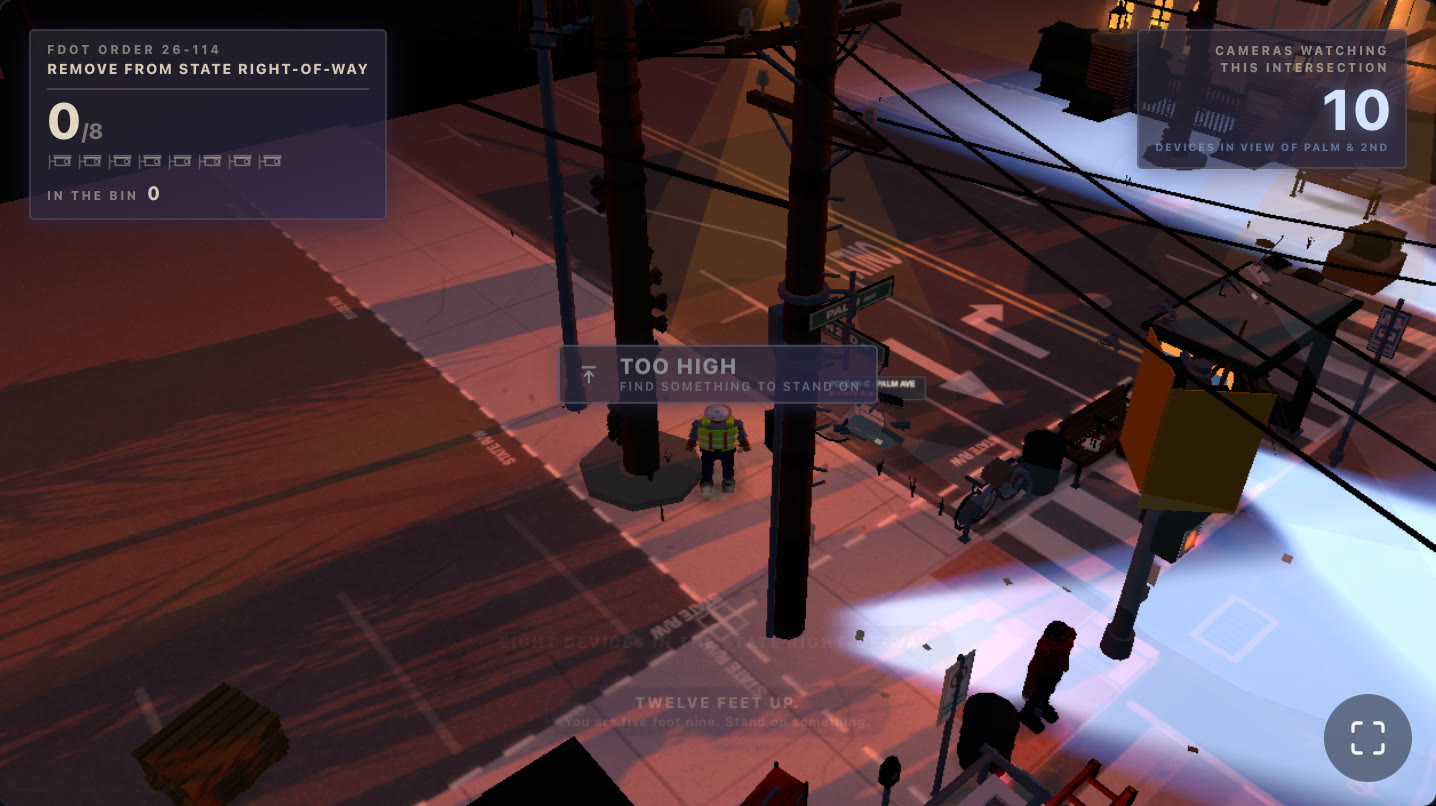
After. Still darker than the concept shot, but the asphalt is asphalt and the surveillance cones are finally the coolest light in a warm frame, which is the only readout the game has.
What I would carry to the next one
Check where your operator's early-out is before you pick it. Every tonemapper is designed around a knee. If your whole scene lives below it you are not getting the operator you chose, you are getting only whatever it does on the way in. Mine was a black point I never asked for.
Anything that touches min(r, g, b) has an opinion about your weakest channel. A two-tone rig, warm key plus cool fill, guarantees a weakest channel by construction, and it is always the one between the two temperatures. That is green for warm-and-cool, which is most cinematic lighting ever devised.
Set a clear colour you would never ship. A transparent canvas over a styled container turns missing geometry into art direction. Magenta clear, alpha: false, anything. If the failure mode is not ugly, it is not a failure mode, it is a feature you will find in three weeks.
Sample a column, not a vibe. Four identical numbers where a gradient should be told me more in one command than an hour of staring at the same screenshot. I had been looking at that "sky" all night.
One honest note on where this ended up. I got the street reading as a street and then the run was called before I could take another pass at it, so this game shipped without ever going up against the bar I set for it, which was Untitled Goose Game. The corner is legible, the cones are cool, the mechanics work on a phone. The polish is not finished and I am not going to pretend otherwise. Mean luminance is still 48 against a target of 73.