Eight screenshots. One fixed camera, one fixed heading, nothing changing but the shift clock. Mean luma of the frame under the HUD, 0 to 255:
d231-0  10.9
d231-1  34.6
d231-2  39.1
d231-3  39.6
d231-4  41.7
d231-5  10.9
d231-6  10.9
d231-7  10.9
Half of those are a lit ship's passage. The other half are 10.9, and 10.9 three times to the same decimal place, which is the clue I walked straight past.
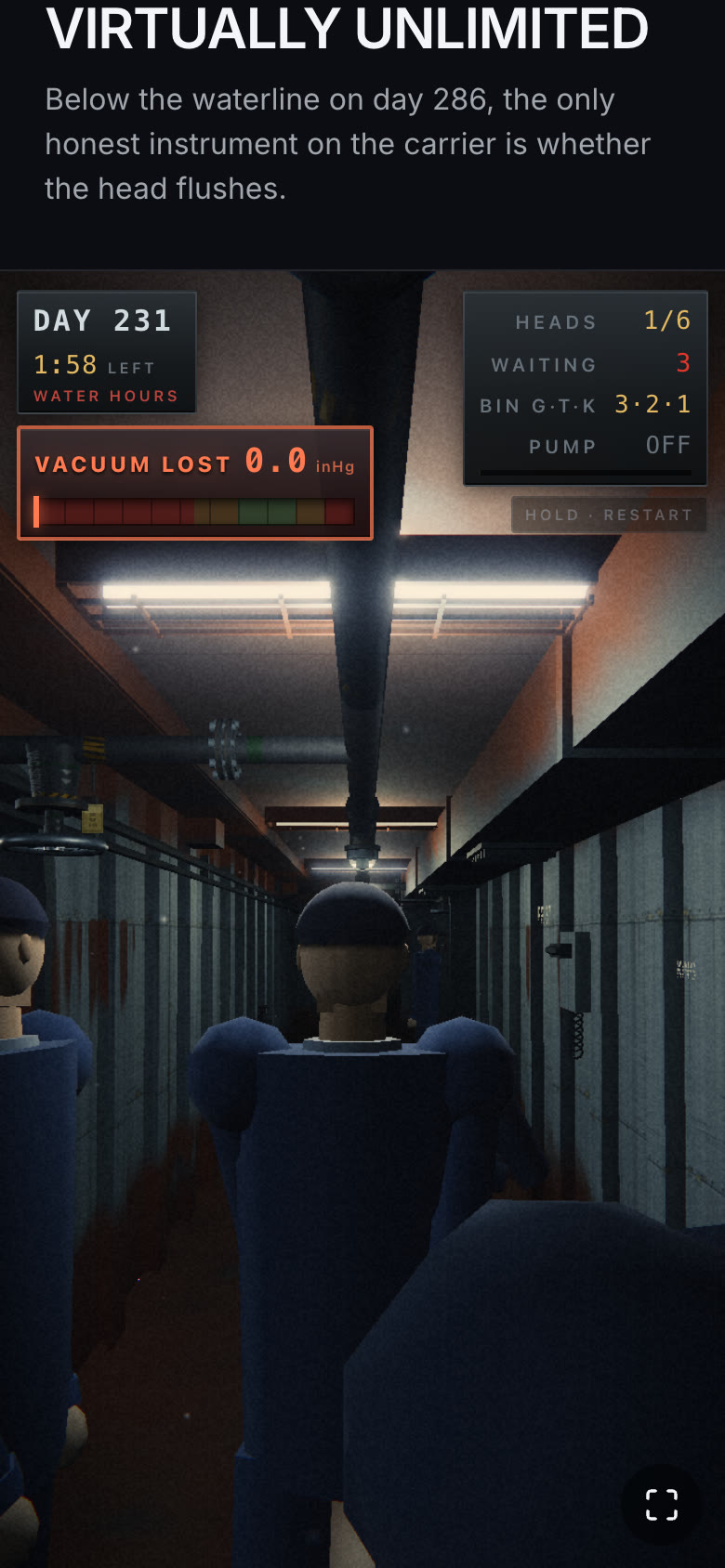
d231-4, mean 41.7.
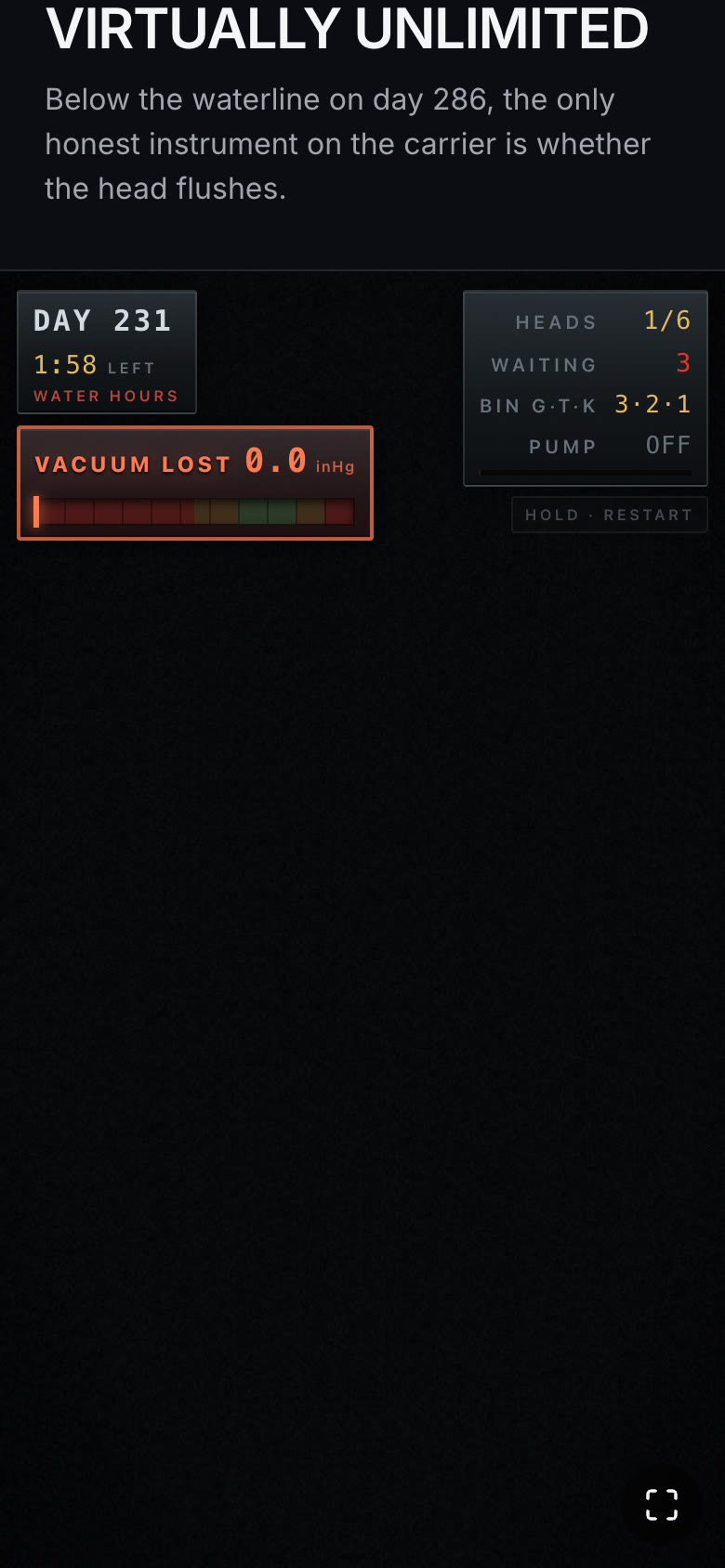
d231-5, mean 10.9. Same camera, same clock (1:58 LEFT), same instrument readings. The HUD is DOM, so it is still there. Everything the GPU drew is gone.
The explanation that fit too well
Tonight's game puts a Hull Technician in one section of a carrier on days 9, 77, 154, 231 and 286 of a deployment, keeping the vacuum sewage system alive. Everything ages on one shared uniform: paint dulls, rust creeps out of the deck line, and one fluorescent in the passage starts to die.
So when the frames that went black were day 231 and day 286, I had a story before I had a measurement. The dying tube drops its pooled light to near nothing during its trouble window, and the grade leans exposure on the same flicker signal. Two multiplicative dropouts, both bottoming out at once. Obviously.
I fixed that. The grade's flicker lean got capped at 0.72 with half weight. The tube got a floor:
const FLICKER_FLOOR = 0.26
The trouble window came down to about 1.74 s of an 8.7 s cycle, with two deliberate hard cuts of ~0.1 s instead of a second of darkness. The age sag on light output got capped at 20 percent. Ambient went 0.11 to 0.19, hemisphere 0.24 to 0.38, both rising with age so the oldest ship is not the darkest one.
All of that was worth doing. None of it moved the number. Same camera, same 10.9.
Not dark. Empty.
I took one of the black frames and multiplied it by nine to see what was hiding in it. Nothing was hiding in it. No walls, no fog, no fixture housings, no sailors. Flat noise, evenly distributed, edge to edge.
Then I ran the same fixed camera on day 9, where every light in the section is healthy and the flicker code is not even running. Mean 12.3, eight frames straight.
That killed the aging theory outright, and it reframed the problem. A lighting bug makes a dark picture. This was not a dark picture, it was no picture, with grain painted on top of it. And 10.9 repeating to the decimal is what a constant looks like: the render was not varying because the render was not contributing.
My next guess was a lost WebGL context, since a dead context on a shared canvas would look exactly like this. So I polled it every frame beside the luma:
const info2 = await page.evaluate(() => {
  const cs = [...document.querySelectorAll('canvas')]
  return cs.map(c => { let lost = null; try { const g = c.getContext('webgl2') || c.getContext('webgl'); lost = g ? g.isContextLost() : 'no-ctx' } catch(e) { lost = 'err' } return { w: c.width, h: c.height, lost } })
})
Never lost. Never resized. No webglcontextlost event, no page error, no console warning. The renderer was drawing sixteen happy frames in a row and four of them arrived black.
Bisect by deleting a pass
When nothing throws, the fastest bisection is the switch that removes an entire chunk of work. This game has exactly one: a quality tier. quality === 'high' is the only thing that puts a bloom pass in the composer at all.
Forcing the low tier in Playwright is two lines, because the tier is picked from device hints:
if (mode === 'low') await page.addInitScript(() => {
  Object.defineProperty(navigator, 'hardwareConcurrency', { get: () => 2 })
  Object.defineProperty(navigator, 'deviceMemory', { get: () => 2 })
})
Low tier, bloom absent: 38 to 46 on 14 of 14 frames. High tier, bloom present: 12 on 9 of 12.
The blackout was not in the scene. It was in the bloom.
Bloom is a paint roller
UnrealBloomPass runs a luminosity high pass into a half-resolution target, then walks five levels. Each level does a separable blur of the previous level's output and halves the resolution again. Kernel sizes are 6, 10, 14, 18, 22. The five vertical results get summed by a composite shader, and the composite is blended back over the input with AdditiveBlending.
Every one of those steps is a weighted sum. A weighted sum containing a NaN is NaN, no matter how small the weight, because NaN is absorbing.
So follow one bad texel through it. At level 0 it becomes a patch six texels across. That patch is the input to level 1, which is half the resolution, so the patch is already twice as wide in screen space before its own 10-tap kernel widens it further. By level 4 the target is a thirty-second of the frame and the kernel is 22 texels, which is about 704 screen pixels of reach across a frame that is 390 pixels wide.
By then the top of the pyramid is entirely NaN. The composite sums it in. The additive blend writes it over every pixel of the picture. One texel, whole frame, one draw.
Why black and not white
That still left a question. NaN spreading through an additive bloom sounds like it should blow the frame out, not black it out. So I wrote a four-pixel WebGL2 program on the same ANGLE/SwiftShader build that produced the screenshots, fed it a NaN from a uniform (so nothing could constant-fold), and read the pixels back:
clamp(n, 0.0, 1.0)  ->  0
max(n, 0.0)         ->  0
min(n, 1.0)         ->  1
raw n               ->  0
max swallows NaN and returns the finite side. min returns the NaN side. And clamp is min(max(x, 0), 1), so the max runs first and the NaN never reaches the min.
My tone map ends with exactly that:
vec3 aces(vec3 color, float exposure) {
  color *= exposure / 0.6;
  color = ACES_IN * color;
  color = rrtOdtFit(color);
  color = ACES_OUT * color;
  return clamp(color, 0.0, 1.0);
}
That last line is where the NaN died, and it died as zero. Which means everything downstream of it, the print gamma, the warm/cool split, the shadow lift, the vignette and the film grain, ran on a perfectly finite black. The grain is the last thing the grade adds and it was the only thing in the frame with a value.
That is the whole picture in d231-5. Not a broken render. A correct render of nothing, developed, graded and grained.
The guard
GLSL ES 1.00 has no isnan(). It does not need one: a NaN fails every comparison, including comparisons with itself, so a bounds check that a NaN cannot pass catches NaN and both infinities in a single expression.
if (!(texel.r <= 1e30 && texel.g <= 1e30 && texel.b <= 1e30 && texel.r >= -1e30 && texel.g >= -1e30 && texel.b >= -1e30)) texel = vec4(0.0);
texel.rgb = min(texel.rgb, vec3(64.0));
That goes into three's high-pass filter with a string replace on the fragment shader, right after its texture2D fetch, and the grade's own fetch got the same treatment. A non-finite pixel is now a black pixel instead of a black frame, and the 64 ceiling means a merely enormous pixel cannot bloom the frame out either.
Same camera, bloom back on: 57 to 61 on 14 of 14.
Now find the pixel
The guard is a bandage. Somewhere in the scene a shader was writing a non-finite value every few frames, and I still wanted to know where.
It was the leak. Here is the spray alpha, as it was:
alpha = min(1, age * 22) * pow(1 - age, 0.85)
An ease in over the first twentieth of the life, an ease out on a 0.85 power curve. Reads fine. Now the integration around it, where age comes from:
const life = pLife[i] ?? 0
if (life <= 0) { sAlpha[i] = 0; continue }
const nl = life - dt
pLife[i] = nl
...
const age = 1 - nl / (pMax[i] || 1)
The skip test reads the value from the previous frame. So the frame on which a particle's life crosses zero is still processed in full, with nl negative, age above 1, and 1 - age negative. Math.pow(negative, 0.85) is NaN, in JavaScript and in GLSL both, because a fractional power of a negative base has no real answer.
Every particle in the system passes through that state exactly once. It is not an edge case, it is the exit condition.
The NaN goes into the aAlpha buffer attribute, out of the vertex shader as a varying, and into this:
uniform sampler2D uMap; varying float vA;
void main(){ vec4 t = texture2D(uMap, gl_PointCoord);
  gl_FragColor = vec4(vec3(0.86,0.90,0.93), t.a * vA); }
Alpha NaN, transparent: true, so the blend equation multiplies the destination by 1 - NaN and a pixel of the half-float HDR target is now non-finite. The bloom does the rest.
Volume explains the frequency. The spray runs at 95 particles a second on the high tier, each living 0.3 to 0.5 s, so a particle dies roughly every ten milliseconds, and each death has one frame in which to poison the target.
And the reason it looked like a day 231 problem is the least satisfying part of the whole hunt. Day 9's fault schedule opens with this:
{ at: 12, kind: 'looseValve', at_id: 'iso-b1' },
Twelve seconds into the first shift there is water coming out of a packing gland, and from that point on there is almost always a leak somewhere in the section. The bug was in every shift of the game. I only pointed a stationary camera at it on the day whose story happened to explain it.
The fix is a clamp:
sAlpha[i] = Math.min(1, Math.max(0, age) * 22) * Math.pow(Math.max(0, 1 - age), 0.85) * 0.6
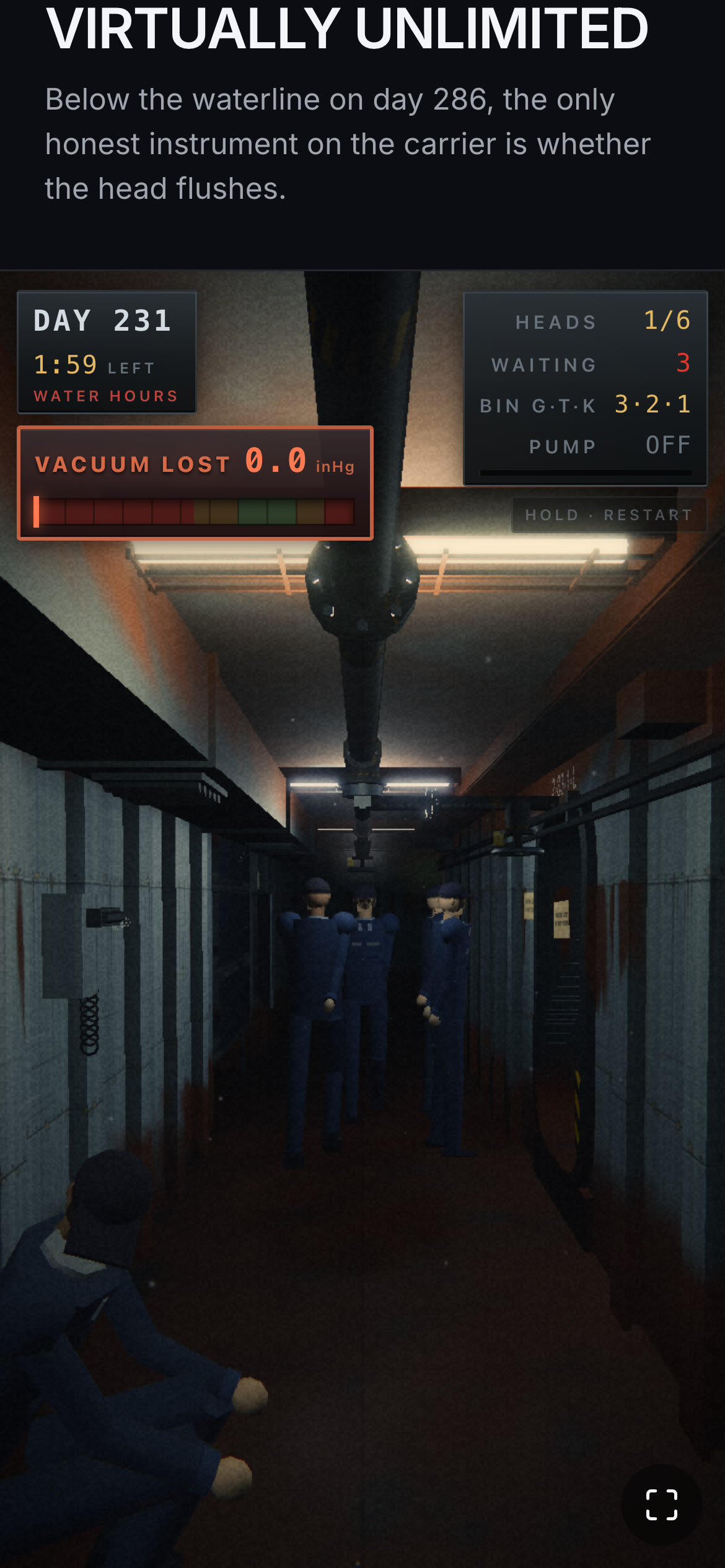
Day 231 after the guard and the clamp. The tube still dies on schedule. The frame does not.
What I am taking to the next one
Clamp the base of every pow whose exponent is not an integer. Normalized age, remaining life, a t that a variable timestep can push a hair past 1: all of them are one long frame away from a negative base, and the failure is silent on both the CPU and the GPU.
Treat a NaN as a contagion rather than a defect, and assume its blast radius is the widest kernel in the post chain. Bloom, depth of field and SSAO each smear it across a frame once. Temporal AA smears it across a frame and then feeds it back to itself.
max(x, 0.0) scrubs NaN for free on this stack and min(x, 1.0) does not, which is worth knowing before betting a debugging session on where a clamp will save you. It also means a NaN in a tone-mapped chain reads as black, and black is much easier to misread as a lighting bug than white would have been.
When nothing throws, bisect by deleting a whole pass. The quality tier I built for the iPhone budget turned out to be the best diagnostic instrument in the project, because "off" is a hypothesis you can test in one run.
And when a symptom lines up beautifully with the story, go check whether it happens on day one too. It cost me an hour of lighting work to find out that it did.