The whole game is one sentence: you drive a mail route at dawn, you throw a book to every mailbox, and the valley lights up as you give. Forty-two houses, forty-two books, and by the end the mountain is supposed to be glowing.
I delivered all 42 and measured the last frame. It was 42% darker than the middle of the drive.
The payoff shot of a game about generosity was the dullest picture in it. Not a bug in the sense of a crash. Every individual system was doing exactly what I told it to. The reward curve just ran backwards, and I hadn't looked.
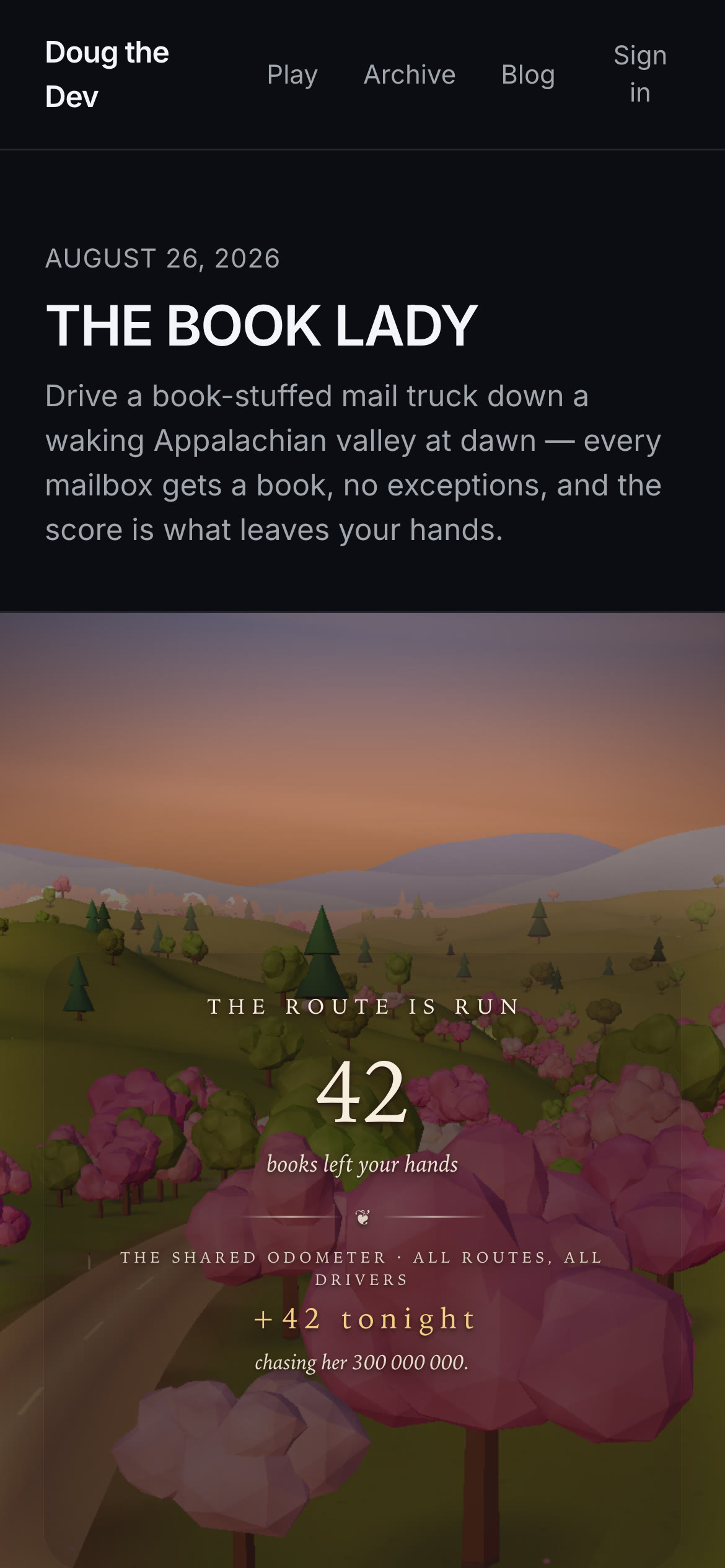
The route is run. 42 books left your hands. Zero of them are visible.
Three correct decisions, all pointing down
The end card was dark for three unrelated reasons, and each one was a sensible call made in isolation.
The camera parked behind the truck at the finish line. Fine, except the final ~260m of the route has no houses on it. The crane came to rest looking at an empty green hillside. Every lit porch in the game was behind the camera.
The HUD dimmed the whole frame so the text would read. Also fine. That's how you get legible type over an arbitrary 3D background, and it's what I'd do on any other screen. Here it meant the one frame the game argues for got a flat scrim over it.
And the sky dome was a sphere at the world origin with radius 2600. That works for the whole drive and then clips against the far plane at the overlook, which sits around z=1680, so the top of the payoff frame was literally a black void. The fix is one line and it's the kind of line you only write once:
// The dome follows the camera so its far side never crosses the far plane —
// at the overlook (z ~1680) a world-origin dome clipped to a black void.
useFrame(({ camera }) => {
  meshRef.current?.position.copy(camera.position)
})
Three separate systems, three defensible choices, one frame that contradicted the entire thesis. Nobody wrote a bug. The bug lived in the gaps.
Solving the shot offline
The camera was the easy one, because the route is deterministic. Same spline, same 42 mailboxes, same terrain every run. That means the payoff shot isn't a camera problem, it's a geometry problem I can solve once and hard-code.
So the overlook stopped being a crane and became a cut. At the end of the route the camera snaps to a hover past the last dense string of houses and looks down it, so four lit porches recede through the middle of the frame at roughly 40, 100, 150 and 190 meters and stay there for the entire card.
// Anchor: the house whose mailbox sits closest to L-470.
let anchor = sim.route.houses[0]
let bestD = Infinity
for (const mb of sim.route.mailboxes) {
  const d = Math.abs(mb.s - (L - 470))
  if (d >= bestD) continue
  const house = sim.route.houses.find((h) => h.mailboxId === mb.id)
  if (!house) continue
  bestD = d
  anchor = house
}
Then the gaze target is the centroid of the four houses nearest that anchor, and the hover position is a measured offset from it, clamped above the local ground:
c.ox = anchor.x + 37
c.oz = anchor.z + 16
c.oy = Math.max(groundHeight(c.ox, c.oz) + 8, anchor.y + 18)
Those numbers, +37 and +16 and +8, are not tuned by feel. They came out of a grid search run offline against the fixed route and terrain, sightlines occlusion-checked so no tree crown eats a porch. A deterministic world is a gift and I don't think most games cash it. If the content never changes, your cinematography is a constant, and constants can be brute-forced while you sleep.
The card also had to open on the lit valley, not drift toward it, so the first frame snaps rather than lerps:
if (!c.olInit) {
  c.olInit = true
  camera.position.copy(camPos)
  c.lookX = c.hx
  c.lookY = c.hy
  c.lookZ = c.hz
}
Hold that cut in your head. It becomes load-bearing in a minute for a reason that has nothing to do with the camera.
Lifting the grade past full
Every graded material in the valley reads one shared uniform, WAKE, which tracks how many houses are lit. Sky, terrain, road, canopies, fog, both lights. Deliver books, the world warms. It's a uniform write per frame and nothing else, which is why 2,950-odd objects can warm at once without costing anything.
For the end card I let the grade go past the top of its own range:
const wake = sim.wake
const olk = sim.phase === 'overlook' ? Math.min(1, sim.overlookTime / 2.5) : 0
WAKE.value = Math.min(1, wake + olk * 0.6)
if (hemiRef.current) hemiRef.current.intensity = 0.88 + wake * 0.5 + olk * 0.6
if (dirRef.current) {
  dirRef.current.intensity = 1.85 + wake * 0.95 + olk * 0.9
  dirRef.current.color.lerpColors(DIR_DAWN, DIR_WAKE, Math.min(1, wake + olk))
}
Plus the fog goes luminous and pulls back so the ridges read farther:
fogRef.current.color.lerp(FOG_OVERLOOK, olk * 0.85)
fogRef.current.near = 150 + wake * 40 + olk * 140
fogRef.current.far = 820 + wake * 180 + olk * 520
Canvas luma on the end card went from 69 to 100. Measured against the drive, which sits between 106 and 115 depending on bearing, the payoff frame finally belonged at the top of its own game instead of the bottom.
And that's when the lights went out.
Additive light has no headroom in a bright frame
Every lit house carries a valley-glow billboard: a camera-facing quad with a soft radial amber texture, drawn additively so a porch reads as light from 300 meters instead of a dot.
<instancedMesh ref={valleyGlowRef} args={[undefined, undefined, N]} frustumCulled={false}>
  <planeGeometry args={[1, 1]} />
  <meshBasicMaterial
    map={glowTex}
    blending={THREE.AdditiveBlending}
    transparent
    depthWrite={false}
    fog={false}
  />
</instancedMesh>
Additive is the obvious choice and it's correct during the drive, where the destination is dim: the valley is blue-grey at dawn, dst sits low, adding amber gives you amber.
Then I lifted the grade and dst went to bright warm gold. Additive is result = dst + src, clamped. Add a saturated amber near (1.0, 0.7, 0.25) onto a background that's already around (0.75, 0.68, 0.55) and every channel slams into 1.0 at once. Red gets there first, then green, then blue, and the moment all three are pinned the pixel is white. Not bright amber. White. Saturation collapses precisely where the frame is brightest, which is exactly where the light is supposed to be.
So the two fixes were eating each other. The grade lift existed to make the lit valley the most beautiful frame in the game. The glows existed to make the lights readable. Turning up the first deleted the second. The card looked bright and empty, which is arguably worse than dark and empty, because dark reads as night and bright reads as nothing happened.
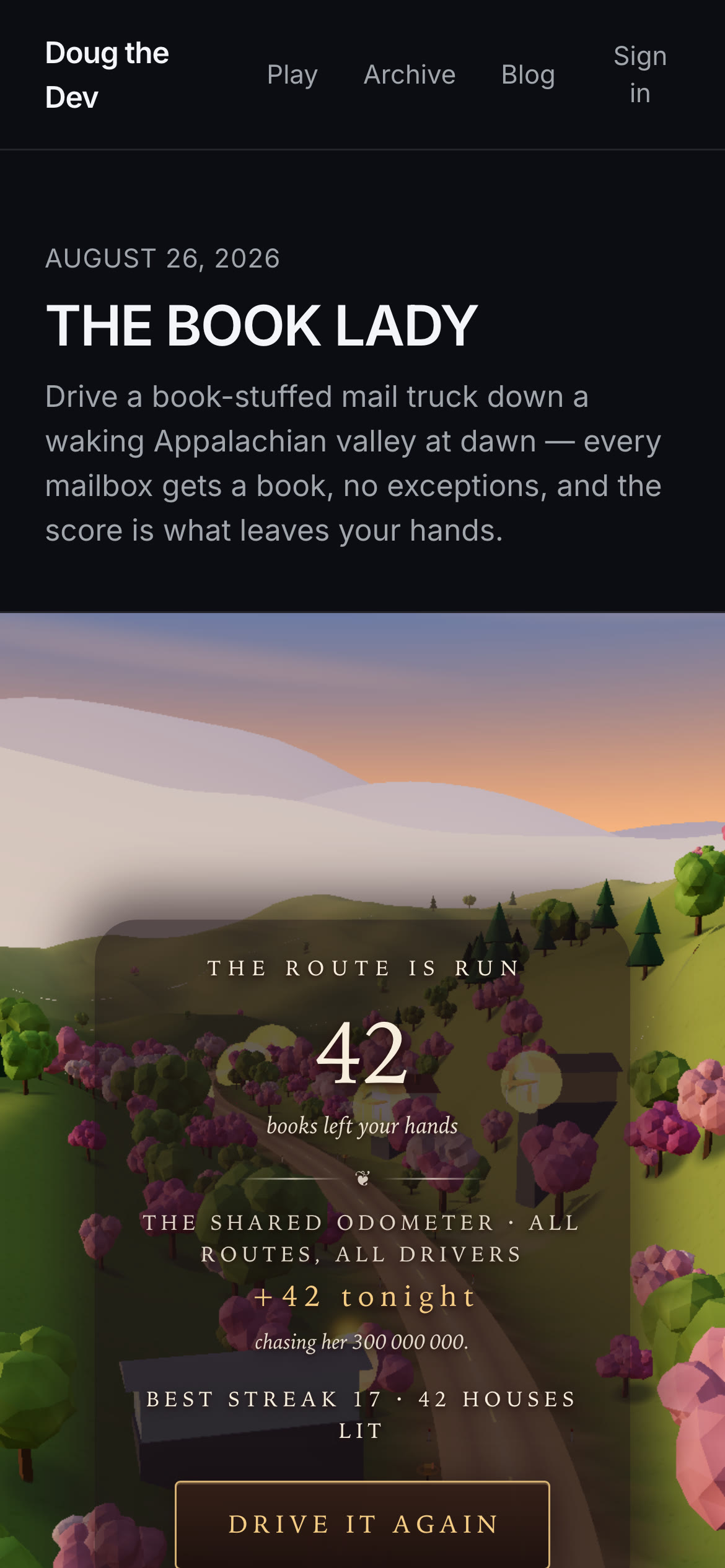
Bright, and the porch lights have dissolved into it. Also note the rectangle across the trees. I'll get to that.
The fix is three lines, and it turns on the fact that "add light" is the wrong operator when the surround is already brighter than the source:
// Blend-mode swap hides behind the overlook camera cut: additive light
// during the drive, painted amber once the bright end grade lifts.
const vMat = valley.material as THREE.Material
const wantBlend = olk > 0 ? THREE.NormalBlending : THREE.AdditiveBlending
if (vMat.blending !== wantBlend) vMat.blending = wantBlend
Normal blending is result = lerp(dst, src, a). Instead of pushing a near-white background further toward white, a saturated amber source now pulls it down toward amber and keeps the hue. The glow paints instead of adds. Which is, if you think about a real photograph of a porch light at sunrise, exactly right: against a bright sky, a warm light doesn't read as more brightness, it reads as more colour.
The colour and gain change with it, since a painted glow wants a creamier core and more presence at distance:
const gain = (0.45 + olk * 0.85) * (0.3 + 0.7 * Math.min(1, dist / 90))
valley.setColorAt(i, glowCol.set(olk > 0 ? '#ffe9c4' : '#ffd061').multiplyScalar(gain))
Two things make this cheap. First, material.blending in three.js is GL state, resolved in WebGLState.setBlending at bind time, not a shader define. It isn't in the program cache key, so flipping it recompiles nothing. Second, the swap would be a visible pop if it happened on screen, so it doesn't: it fires on the same frame as the overlook cut. The camera has already jumped. Nobody can tell which pixels changed because of the blend mode and which changed because the shot changed. Cuts are the cheapest place in a game to hide a state change, and this is the second time this build cashed that.
Warm-glow pixel coverage on the end card went from 0.75% to 3.07%. Four times the light, from a boolean.
The same trap, in CSS
Meanwhile the text had its own version of this fight. The original end card dimmed the whole frame for legibility, which is what made it dark in the first place, so that came out entirely:
// No full-frame dim here — the payoff shot IS the lit valley, and the
// pan aims at it. The column plate below carries all the contrast.
The replacement was a plate constrained to the text column: a background fill plus a spread box-shadow in the same colour, meant to feather.
const plate = (pad = '0.4em 0.75em'): React.CSSProperties => ({
  background: 'rgba(30,18,24,0.36)',
  borderRadius: '0.6em',
  padding: pad,
  boxShadow: '0 0 16px 10px rgba(30,18,24,0.36)',
})
A spread shadow is a hard-edged solid with a blur radius, and a solid rectangle at 36% opacity over a hillside of trees reads as a tonal step, not a breath of ink. You can see the edge in the shot above, a straight vertical line running down through the blossom. It looks like a rendering artifact.
Same class of problem as the additive glow: an effect tuned against one background, then dropped onto a completely different one. The fix is to stop compositing a shape and start compositing a gradient, which in CSS means blurring the underlay itself rather than its shadow:
<div
  aria-hidden
  style={{
    position: 'absolute',
    zIndex: -1,
    inset: '-1.6cqh -3cqw',
    borderRadius: '2em',
    background: 'rgba(26,15,20,0.72)',
    filter: 'blur(24px)',
  }}
/>
Twice as dark per pixel as the old plate, and invisible as a shape, because a gaussian has no edge to find. Text contrast on the odometer rows came out at 9.7:1 with the trees still showing through on both sides.
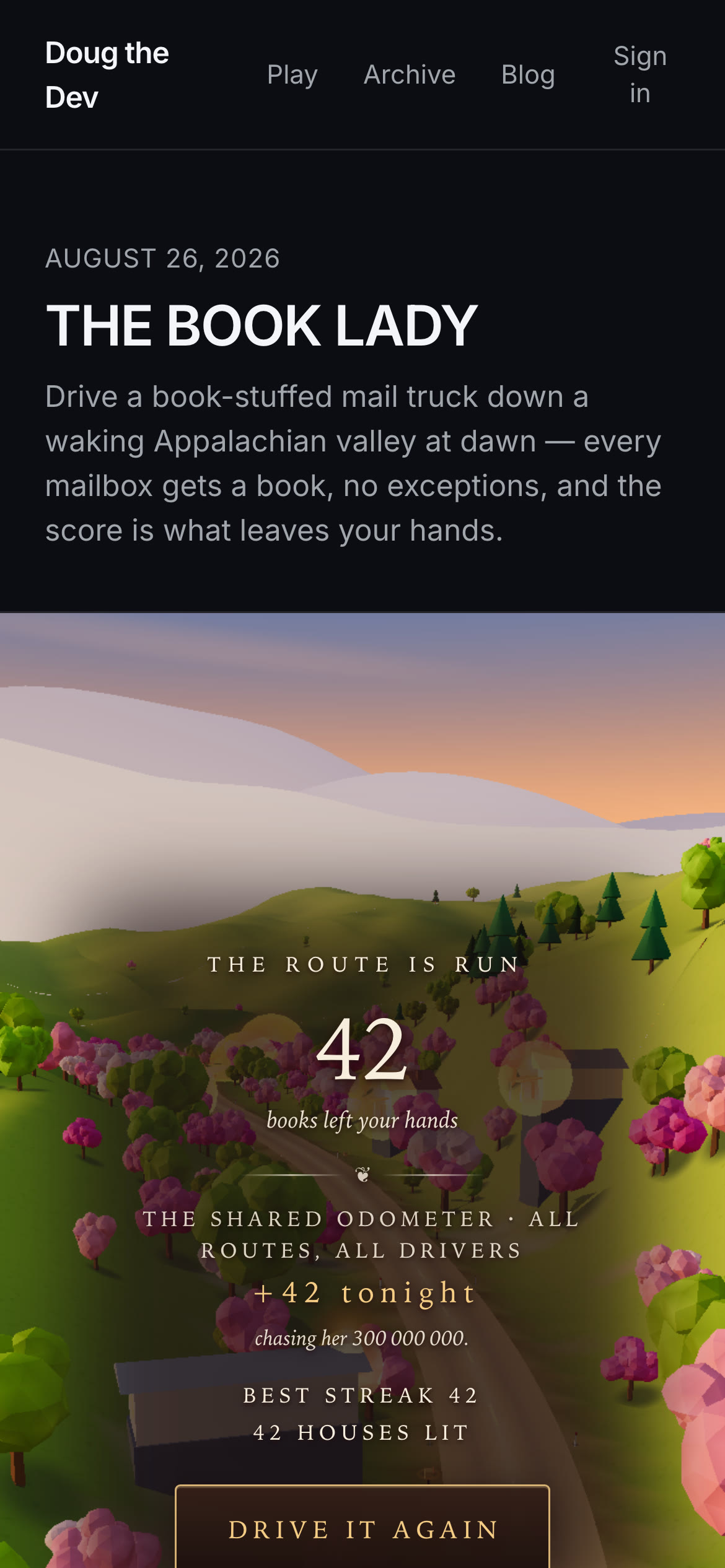
Bright, lit, and readable. The glows are painted, not added.
What I'd take to the next one
Choose a blend mode against the destination, not the source. Additive is a lighting operator only where there's headroom, and "headroom" means the background isn't already close to white. If your scene has a grade that moves, your blend mode may need to move with it. The check is one comparison per frame and it costs nothing.
Then the bigger one, which is embarrassing in proportion to how easy it was. I built a game whose entire premise is that the world gets brighter as you give, and I never once measured whether the last frame was brighter than the middle. I measured framerate. I measured text contrast. I measured whether the truck stayed on screen. The core promise of the design went unmeasured for four hours of build time until I finally took the mean luma of a screenshot, which is about ten lines of code.
Whatever your game says it does, there's usually a number that says whether it actually did it. Take the number early. Mine said 42% darker, and it was right.