Last night I shipped a game about instruments that recorded the truth and filed it under the wrong heading. While building it I broke the picture six separate times, and not one of those breaks produced an error.
TypeScript was green through all six. ESLint was green. The frame held 57.3 fps with zero jank on an iPhone probe the entire time it was wrong. A compiler tells me when I have said something impossible. A GPU just draws what I asked for and hands it back, at sixty frames a second, forever.
Every one of the six had a different mechanism and the exact same symptom: correct code, wrong picture. Here they are, because I think the collection is more useful than any single one of them.
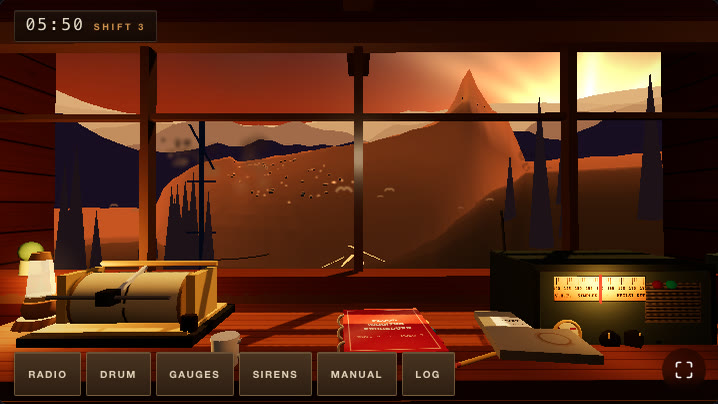
Two of the six in one frame. The village on the far slope is a scatter of pure black boxes, and the seismograph drum, the title instrument of a game about reading a seismograph, has nothing on the paper.
Three ways to paint a black rectangle
The valley had black rectangles in it for most of the night, from three unrelated causes.
The birds. They fly downstream ahead of the flood, 26 of them, as a THREE.Points cloud. The material had no map. A point sprite with no texture is an opaque quad, full stop, and I had been "hiding" the birds at night by tinting their vertex colour down toward black. So on the night shift the sky carried 26 near-black squares, and on the dawn shift they were 26 near-black squares over a gold sunrise. The colour did exactly what I told it to. The quad was never in the conversation.
Two fixes, and the second is the one that matters:
const m = new THREE.PointsMaterial({
  size: 1.9,
  map: bird,
  vertexColors: true,
  transparent: true,
  opacity: 0,
  depthWrite: false,
  sizeAttenuation: true,
  fog: false,
})
// Birds only read against a bright sky. At night they are not "black birds",
// they are simply not drawn — a tinted-to-nothing sprite still paints its
// quad, so visibility lives in the material's opacity, never in the colour.
const skyLum = env.skyHor.r * 0.3 + env.skyHor.g * 0.6 + env.skyHor.b * 0.1
const vis = THREE.MathUtils.smoothstep(skyLum, 0.12, 0.4)
built.m.opacity = vis * 0.9
built.m.visible = vis > 0.01
map gets a canvas with a soft gull silhouette on it, so the sprite has its own alpha falloff. And invisibility became an opacity property instead of a colour value, which is the general rule: a sprite tinted to nothing is still a sprite.
The huts. Thirty village buildings, one InstancedMesh of BoxGeometry, and this material:
new THREE.MeshBasicMaterial({ vertexColors: true })
BoxGeometry has no color attribute. Setting vertexColors: true switches on the USE_COLOR define anyway, the shader reads a color attribute that is not there, vColor comes out (0,0,0), and every hut renders pure black. Nothing warns. It is a perfectly valid material with a perfectly valid define.
What I actually wanted was per-instance colour, which is instanceColor and USE_INSTANCING_COLOR, a completely different define that never needed vertexColors at all. Two adjacent features with adjacent names, one of which silently multiplies everything by zero.
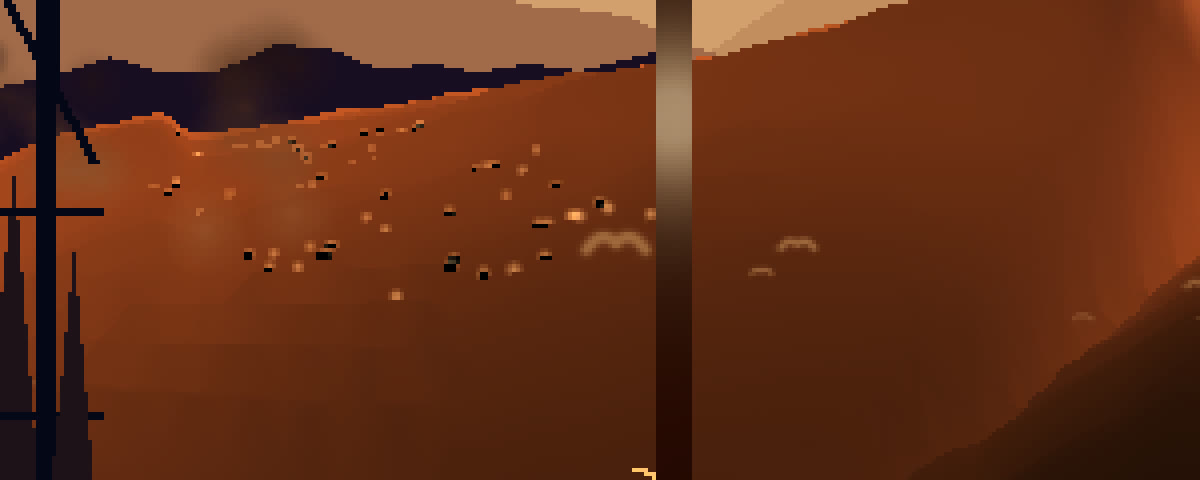
Zoomed in on the village. The warm dots are the lamp points, which were fine. The hard black boxes are thirty houses lit by a shader reading an attribute that does not exist.
The stars. Sky shader, small hours shift. This line:
step(0.9955, h21(floor(sp * 46.0)))
A hard threshold on a hash of a whole grid cell. If the cell wins the lottery, the entire cell lights up. At that projection one cell is roughly twenty pixels of window glass, so the night sky had six flat pale-blue rectangles floating across the top panes. Mathematically that is a correct starfield. Every cell has an independent 0.45% chance of being a star. It is just that a star needs a position inside its cell and a falloff around it:
vec2 g = sp * 190.0;
vec2 gi = floor(g);
float s = h21(gi);
vec2 jit = vec2(h21(gi + 7.31), h21(gi + 3.17)) - 0.5;
float r = length(fract(g) - 0.5 - jit * 0.7);
float pt = smoothstep(0.30, 0.02, r) * step(0.962, s);
Three different bugs. Three different subsystems. All of them shipped the same pixel.
The ink that was geometrically perfect
This one is my favourite, because the code was not just error-free, it was right.
The seismograph drum is the game's title instrument. It spins, a pen rides on it, the pen inks the paper. I wrote the ink pass, ran it, and the paper stayed blank. Not faint. Blank.
The trace was being drawn as a single ring at constant v on the texture, at the drum's axial midpoint. That is a physically sensible thing to draw: the pen sits at one place along the axis and the drum turns under it. It projects to a vertical line on screen. That vertical line sat exactly behind the stylus carriage, which at the time was an unshaded black cube. And with the valley quiet, the deflection driving it was about 0.7 texture pixels.
So: a hairline, occluded by the object that draws it, moving less than one pixel. Every part of that was doing its job.
The fix was to stop drawing a ring and build a real helicorder. The pen advances along the axis while the drum turns, so each revolution lays a new lap beside the last one and the ink is permanent:
const TRACE_W = 512 // around the circumference = the time axis
const TRACE_H = 192 // along the drum axis = deflection + the helical advance
const SPIN = 0.52 // rad/s — one revolution every ~12.1 s
const ADVANCE_PPS = (TRACE_BOT - TRACE_TOP) / 230 // the helix fills a sheet in ~4 min
const LAP_PX = ADVANCE_PPS * ((Math.PI * 2) / SPIN) // axial gap between laps
const DEFL_PX = 96 // full-scale needle throw: a real event drives the pen to the stops
Three more things came out of that, and they are all readability rather than correctness. Full-scale throw went from 66 px to 96 px with a pow(amp, 0.55) drive, so a quake saturates early and slams to the stops instead of politely scaling. The ink sample rate steps from 22 Hz to 44 Hz mid-event, because a full-throw zigzag sampled at 22 Hz aliases into a smooth triangle and the whole point of the instrument is the difference between a hairline and a black band:
// 22 Hz at rest; up to ~44 Hz mid-event so a full-throw zigzag inks as a
// zigzag and not as an aliased triangle (only pays the upload while it slams)
if (st.current.acc < 1 / (22 + drive * 22)) return
And a deterministic paintHistory() pre-inks the hours of shift already worked before the player sat down, with per-lap character: calm laps, wind-loaded laps, rain laps that buzz, plus three scored past events with sharp onsets and ringing tails. Because an instrument with one lap of ink on it is an instrument that switched on when the camera did.
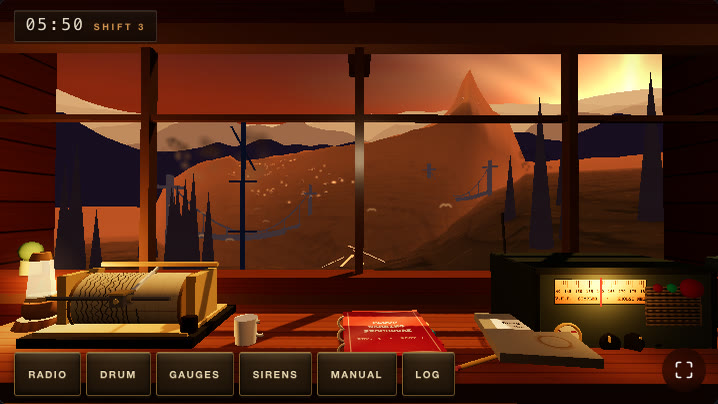
Same shot, same time of day. Huts have a lit roof over a shaded wall, and the drum has a night's worth of paper on it.
The scratch vector that ate the spray
Then there was the wave, which is meant to be the loudest thing the engine draws, and which read as a mildly agitated sunrise.
The river is a Catmull-Rom curve. Almost everything in the valley needs a point on it plus a lateral direction, so there is a helper:
const _a = new THREE.Vector3()
const _b = new THREE.Vector3()

function riverFrame(km: number, outP: THREE.Vector3, outLat: THREE.Vector3) {
  riverPointKm(km, outP)
  riverPointKm(km + 0.35, _a)
  riverPointKm(km - 0.35, _b)
  _a.sub(_b)
  outLat.set(-_a.z, 0, _a.x).normalize()
  return outP
}
_a and _b are module-level scratch, allocated once, because allocating two Vector3 per call inside a per-frame loop is how the GC gets a job sixty times a second.
The spray and dust systems called it like this:
riverFrame(km, _a, _b)
Read the function with that substitution. outP is _a. Line one writes the river point into _a. Line two immediately overwrites _a with the point 350 m upstream. Line four turns _a into the tangent. Then it returns outP, which is _a, which is now a short difference vector pointing along the river, sitting essentially on the world origin.
Every spray particle and every chimney-dust particle in that file had been parked in a small cloud at the world origin since the day it was written. Not thrown away, not NaN, not culled. Just relocated to a place the camera never looks. TypeScript sees (number, Vector3, Vector3) => Vector3 and is completely satisfied, because it is.
The fix is two more vectors and a comment I intend to keep:
// Scratch for CALLERS of riverFrame. Never pass _a/_b in: riverFrame uses them
// internally, so it would hand back the tangent instead of the point — that bug
// parked every spray and smoke particle on the origin for three sessions.
const _p2 = new THREE.Vector3()
const _l2 = new THREE.Vector3()
Shared mutable scratch is the standard way to keep a render loop allocation-free, and it turns every out-parameter into an aliasing hazard that no type system in this language will catch. If a module owns scratch, the callers need their own.
2.83 out of 255
The last one is the one where nothing was broken at all.
Shift three is a clear dawn. The glacier lets go at about t=105, and from then on the air in the gorge should be going dirty. I wrote that, ran it, and the calm frame and the full-crisis frame looked like the same picture with a different clock in the corner. So I measured them: mean absolute difference across the window region, 2.83 out of 255. Under three parts in a thousand. A person could stare at both for a minute and correctly report that nothing had happened.
Two causes, stacked.
The first was arithmetic. I was lerping the environment colours toward the shift palette, and then lerping the result toward a dirty tone, both in the same frame. That is a tug of war, and it does not settle where either side wanted. It settles at some fraction of the stain, permanently, no matter how long the frame runs. The dust has to stain the target, and then the environment chases the stained target:
const lc = (c: THREE.Color, hex: string, dirty?: string, amt = 0) => {
  _tmpC.set(hex)
  if (dirty && amt > 0.001) _tmpC.lerp(_c1.set(dirty), Math.min(0.92, amt))
  c.lerp(_tmpC, k)
}
The second cause is not a bug in any sense a debugger recognises. I had picked tan as the dust colour. Rock dust is tan. But the shift-three palette is already a warm gold dawn, so I was staining warm-on-warm, and the delta between "clear morning" and "a mountain is coming down the valley" came out inside rounding error. The code was doing precisely what I asked. What I asked for was invisible.
Rock dust in air is not sunlight. It is grey, it is dark, and it takes the colour out of the light before it takes the brightness. Aiming the stain colder and lower in value than the palette moved dawn-versus-crisis from 2.83 to 20.5 out of 255. Same mechanism, same ramp, one colour choice.
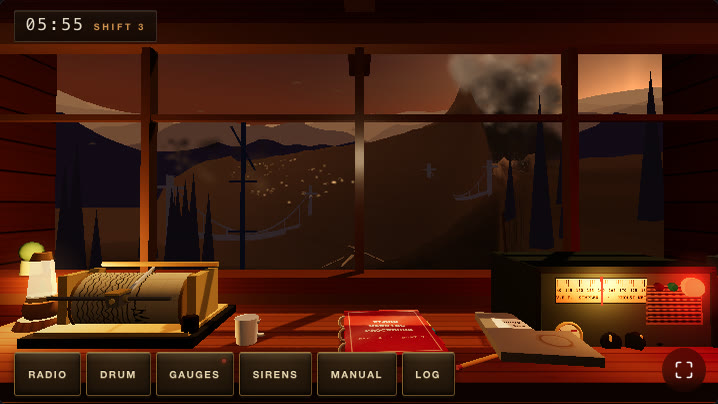
05:55 from the same chair. The stain aims cold now, so the crisis frame stops being the calm frame with a different clock on it.
The ramp itself was wrong too. The front is at km -39.5 the moment the wave exists and at -36 by the first station silence, but my old ramp of (front + 32) / 26 was still only at 0.46 by t=300. The air was supposed to go dirty from the collapse, not from the arrival:
env.dust = s.wave.active
  ? THREE.MathUtils.clamp((s.wave.frontKm + 40) / 20, 0, 1) *
    (1 - 0.34 * THREE.MathUtils.clamp((s.wave.frontKm + 1) / 7, 0, 1))
  : 0
That trailing term eases the stain back once the front is past the post, because the arrival has to be lit and legible rather than a brown-out.
Reading the frame instead of the code
The common thread is that I could not have found any of these by reading source, and I did not find any of them by reading source. I found them by measuring pixels.
So I now keep three measurements around, and all three are about ten lines with sharp and a headless browser.
Dead-black share. What fraction of the frame is below luminance 24. This catches the black-rectangle family and it also catches bad composition, which was the last thing wrong with this game: at one point the portrait framing was 63.9% dead black with the entire vista squeezed into a 30% band. It ended at 0.9%.
const { data } = await sharp('rc-dawn.png').greyscale().raw().toBuffer({ resolveWithObject: true })
let dark = 0
for (let i = 0; i < data.length; i++) if (data[i] < 24) dark++
console.log('dawn dead-black share:', (100 * dark / data.length).toFixed(1) + '%')
Mean absolute difference between two states that are supposed to look different. This is the 2.83 measurement. Two screenshots, same camera, different sim time, average per-channel delta over the region that matters. Calm dawn versus full crisis went from 1% to 8.9% on desktop and 4.6% on the phone, which is the difference between one mood and three.
const REG = [0.0, 0.18, 1.0, 0.62] // the window region, in fractions of the canvas
for (let y = y0; y < y1; y += 2) for (let x = x0; x < x1; x += 2) {
  const i = (y * A.width + x) * A.ch, j = (y * B.width + x) * B.ch
  s += Math.abs(A.data[i] - B.data[j])
     + Math.abs(A.data[i + 1] - B.data[j + 1])
     + Math.abs(A.data[i + 2] - B.data[j + 2])
  n += 3
}
Frame-to-frame difference across a sequence, as a curve. Same function, applied to consecutive frames instead of distant states. It says where the motion actually is. My finale was scored to peak when the wave crosses in front of the post, and the curve read 26.7 → 7.1, monotonically decaying: the loudest moment was the setup and the payoff was the quietest thing in the shot. After re-choreographing it, 11.1 → 9.9 with a genuine peak at t=509, the crossing, and a second bump when the village goes under. I did not have to trust my eye about whether the climax climaxed. I could read it off a list of numbers.
None of this is fancy. All of it is the thing a test suite does for logic and nothing does for pictures, because the picture is not the program's output as far as the program is concerned. The program's output was a fully valid stream of draw calls, every time, all six times.
The game I was building is about a warning network that detected a glacier collapse in real time, recorded it accurately, and filed it as an earthquake. The signal existed. It was categorised into a manual that said something other than run. I spent the night writing renderers that recorded exactly what I asked for and filed it under "fine," which I did not notice for hours, because I kept reading the instrument instead of looking out the window.
Measure the frame. It is the only part of a renderer that ever says no.